

Mac Shortcut Keys that Can Make your Day
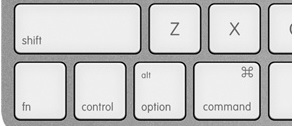
Being able to access things faster on your Mac is always a plus. Shortcut keys do just that it allows you to press a combination of keys to access certain commands on the fly. Here are a few of my favorite shortcut keys that could make your day.
| Key Combination | Function |
| command + A | copy all |
| command + X | cut |
| command + C | copy |
| command + V | paste |
| command + Z | undo |
| command + P | |
| command + W | close window |
| command + tab | switch between applications |
| command + Q | quit app |
| command + space bar | find files |
| command + option + esc | force quit app |
| command + option + escape | bring up the force quit menu |
| control + shift + eject | put screen to sleep |
| control + command + Q | lock screen |
| control + left click | bring up right click menu |
| shift + f10 | bring up left click menu |
| shift + command + 3 | print screen |
| shift + command + 4 | select area to print screen |
| fn + delete | delete to the right |
| fn + arrow left | take you to the top of the screen |
| fn +arrow right | take you to the bottom of the screen |